
AI generates shots faster than a human can finish them. The bottleneck has moved, from "can we make the frames?" to "can we get the frames into a deliverable shape, today, without a TD on standby?" Module 07 is our answer.
01The problem
Generative video models (Veo, Kling, Runway, Sora and the open-source pack) share a polite output preset: roughly 720p, 16 to 24 frames per second, often in whatever aspect ratio the model was trained on. That is fine for a pitch GIF. It is not a deliverable.
To turn a folder of those clips into a reel that survives a client review you need three separate operations: spatial upscale, frame interpolation, and a final repack to the target frame, fps and aspect. Each one historically meant a different binary, a different config file, and a different mental model of what a "good" command-line invocation looks like. Multiply that by twenty shots and a junior editor's afternoon is gone.
02The approach
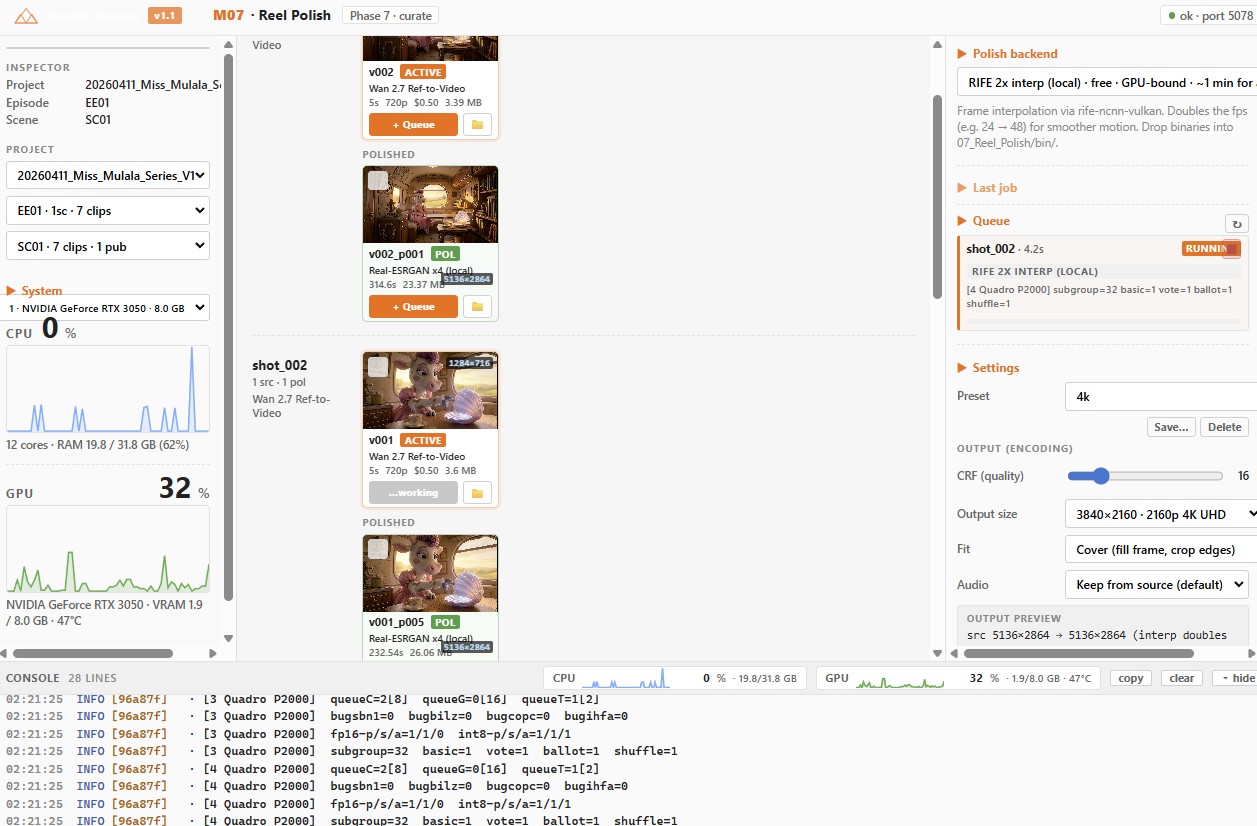
We collapsed the three operations behind a single Flask control panel and gave the operator three knobs that matter: upscale factor, target fps, and output frame (with fit mode. Pad, cover or stretch). Everything else (model selection, ncnn-vulkan flags, ffmpeg map arguments, audio routing) is hidden behind presets the editor never has to read.
Under the hood it's Real-ESRGAN ncnn-vulkan for the upscale, RIFE ncnn-vulkan for the interpolation, and ffmpeg for the final fit-and-finish. A single FIFO worker queue serialises GPU access so two jobs never fight over VRAM. Every subprocess is registered against a job ID, which means there is one button on the panel that always works: Kill.
"We stopped writing render scripts the day the kill switch shipped. That single button changed how the team uses the tool."
03Inside the control panel
The panel is intentionally one screen. The editor picks files, picks a preset, hits go. The rest is observable.
- Bulk select with presets. "1080p / 30fps / 16:9", "Vertical 9:16 social", "4K archival". The editor never types numbers.
- Chain-polish. Output of one stage feeds the input of the next, with input cards turning orange and polished cards green so progress is visible at a glance.
- Audio keep/drop toggle. Most generated clips have no audio track; we map
0:v + 1:a?and let ffmpeg silently skip when missing, so the same recipe works for both. - Reveal-in-folder + light-theme console. When something does break, the operator sees the actual stderr, not a spinner that turns red.
04What's next
Reel Polish is the last gate before delivery in the Nmedia Services pipeline, the modules upstream (Asset Design, Story / Script, Storyboard, Animatics, Animation Sandbox) all eventually feed into it. Next up is a presets registry that travels with the project file, so a "client A house style" preset is one click away on every new job, and an automatic spec-sheet exporter that writes the final fps / resolution / codec back into the project manifest. The pipeline keeps getting shorter.